Webflow AI Features Review: Hands-On Testing and Real Business Impact
If you are evaluating Webflow’s AI capabilities, the first step is understanding how AI website builders function structurally. Before diving into this review, revisit our AI Website Builder Guide: How It Works and What to Look For.
That foundational framework clarifies the difference between surface-level AI enhancements and infrastructure-level intelligence. We are not evaluating aesthetics alone — we are measuring strategic leverage, operational efficiency, and long-term scalability.
Platform Overview and AI Positioning
Where AI Sits Inside Webflow
Webflow has always positioned itself as a visual development platform rather than a beginner drag-and-drop builder. Its AI rollout follows that same philosophy. Instead of replacing control, the AI layer accelerates workflow inside an already powerful design environment.
From a commercial standpoint, this positioning matters. Webflow AI is not built to eliminate thinking — it is built to remove friction from execution.
- The AI Site Builder generates a structured starting framework rather than a locked template.
- The AI Assistant works inside the Designer and CMS instead of creating a separate automation layer.
- The AI enhancements do not override Webflow’s semantic HTML and SEO architecture.
This means experienced operators retain structural authority.
AI Site Builder: Speed Without Lock-In
Initial Site Generation
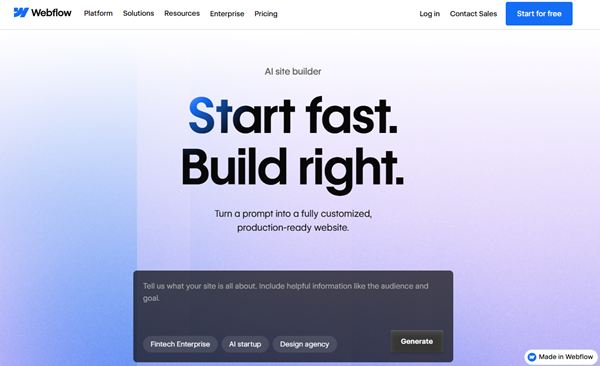
The AI Site Builder allows you to enter a business description and generate a multi-page website with layouts, placeholder copy, and styling direction. The result is not revolutionary, but it is structurally sound and editable.
What matters commercially is not how flashy it looks — it is how modifiable it is.
- Every generated section remains fully editable within the Designer.
- CSS classes and layout structures are not hidden behind automation.
- You can regenerate sections without destroying the entire framework.
This keeps Webflow aligned with founder-level control. However, it does not automatically optimize for conversions, funnels, or keyword clusters. Strategy remains manual.
AI Assistant: Content Acceleration, Not Strategy
On-Page Copy Generation
Webflow’s AI Assistant helps generate and refine content directly inside text blocks and CMS fields. It is particularly useful for expanding short descriptions, rewriting headlines, and drafting first-pass content.
From a Founder-Operator Commercial Engine perspective, this improves throughput but not positioning.
- The assistant does not conduct SERP analysis or competitor evaluation.
- It does not enforce keyword mapping or internal link strategy.
- It does not align content automatically with topical authority models.
This is productivity AI, not marketing AI. It reduces drafting time but does not replace content architecture planning.
AI + CMS: Structured Scalability
Dynamic Content and Collections
One of Webflow’s strongest advantages remains its CMS structure. AI integrates at the field level, allowing you to generate descriptions, summaries, and structured entries across collections.
This becomes powerful when building scalable commercial ecosystems.
- You can generate repeatable content across service pages or product listings.
- You retain relational database control between collections.
- You maintain full SEO control over dynamic template pages.
However, the AI does not auto-build silos or enforce internal linking discipline. You must still architect hierarchy intentionally.
SEO Capabilities: Does AI Improve Ranking Power?
Technical Control Remains Manual
Webflow already provided strong SEO infrastructure before AI. You control meta titles, descriptions, canonical settings, schema insertion, and URL structure.
The AI layer does not materially change that foundation.
- Meta optimization is still manual.
- Schema implementation remains developer-driven.
- Content depth still determines authority.
AI helps you move faster, but ranking outcomes still depend on strategy execution. From a commercial standpoint, Webflow AI is an efficiency tool — not a ranking engine.
Webflow Site and Ecommerce pricing (annual billing)
| Plan Category | Starter | Basic | CMS | Business | Standard Ecommerce | Plus Ecommerce | Advanced Ecommerce |
|---|---|---|---|---|---|---|---|
| Monthly Price (annual) | Free | ~$14 | ~$23 | ~$39 | ~$29 | ~$74 | ~$212 |
| Custom Domain | ❌ | ✔️ | ✔️ | ✔️ | ✔️ | ✔️ | ✔️ |
| Webflow AI | ✔️ | ✔️ | ✔️ | ✔️ | ✔️ | ✔️ | ✔️ |
| Max Pages | 2 | 150 | 150 | 300 | 500 (items) | 5,000 (items) | 15,000 (items) |
| CMS Collections | 20 collections | ❌ | 20 collections | 40 collections | 2,000 CMS items | 10,000 CMS items | 10,000 CMS items |
| CMS Items | 50 | 0 CMS | 2,000 | 40 collections | 2,000 | 10,000 | 10,000 |
| Bandwidth | 1 GB | 10 GB | 50 GB | (higher) | 50 GB+ | 50 GB+ | 50 GB+ |
| Form Submissions (Lifetime/Unlimited) | 50 (lifetime) | Unlimited | Unlimited | Unlimited | Unlimited | Unlimited | Unlimited |
| Ecommerce Support | ❌ | ❌ | ❌ | ❌ | ✔️ | ✔️ | ✔️ |
| Transaction Fees | N/A | N/A | N/A | N/A | 2 % fee | 0 % fee | 0 % fee |
| Use Case | Try & Learn / Tests | Landing Pages | Blogs & Content | High-Traffic Sites | Small Online Store | Growing eCommerce | Large Online Business |
Here’s a side-by-side plan comparison table for Webflow Site and Ecommerce pricing (annual billing) based on the official pricing page and trusted pricing breakdowns:
Key Notes
- Starter is free and great for experimentation, but it cannot connect a custom domain.
- Basic is best for simple sites without CMS (static pages only).
- CMS adds dynamic content capabilities up to thousands of items — ideal for blogs, directories, and SEO-rich sites.
- Business increases limits for high-traffic and larger CMS needs.
- Ecommerce plans build on site plans by adding product storefront features, payment processing, and no transaction fees at higher tiers.
Workflow Efficiency and Commercial Leverage
Founder-Operator Evaluation
Under the AI.SalesMarket Founder-Operator Commercial Engine, tools must answer one question: does this increase leverage?
Webflow AI increases leverage in three areas:
- Faster initial site scaffolding.
- Reduced drafting friction.
- Accelerated CMS population.
It does not increase leverage in:
- Automated funnel optimization.
- Autonomous SEO planning.
- Revenue-focused experimentation.
That distinction is critical for advanced operators.
Limitations and Realistic Expectations
Webflow AI is not a fully autonomous builder. It will not replace strategic planning, conversion design, or structured content ecosystems. It will not build a 50-article authority map for you or manage anchor rotation internally.
What it does do is compress execution time while preserving design authority.
For experienced builders, that is valuable. For beginners seeking automation-driven marketing, it may feel underpowered.
Final Verdict
Webflow AI enhances productivity without compromising structural control. It is best viewed as an acceleration layer inside a powerful visual development platform. For founder-operators who prioritize architecture, scalability, and SEO governance, it is a useful assistant rather than a strategic engine.