Sudowrite Just Got WAY Better (Full Course)
“Write more books with AI (12+ in a year). Join the Story Hacker waitlist and get the actual prompts I use for FREE while you wait: My Favorite Tools for”
A Practical Look at Sudowrite:
What It Does Well (and Where It Doesn’t)
If you’ve been circling AI writing tools for fiction, you’ve probably noticed that most of them promise a lot and deliver… something uneven. Sudowrite has been around for a while, but recently it’s changed enough that it’s worth taking a fresh look—especially if your main goal is drafting fiction, not tinkering endlessly with prompts.
This post walks through how the tool is structured, what you actually pay for, and why one specific feature changes the value equation quite a bit.
Pricing: credits matter more than the sticker price
Sudowrite doesn’t price itself like most subscription tools. Instead of “unlimited” anything, everything runs on credits.
The basics
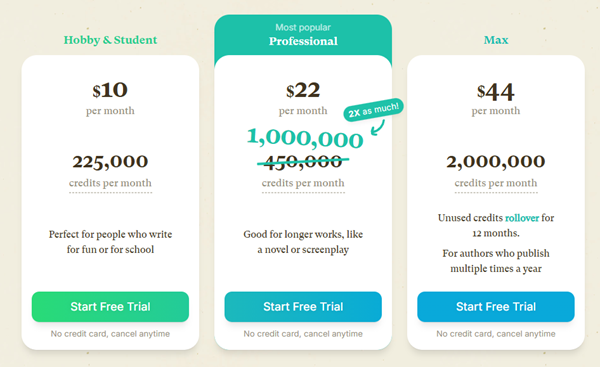
- Monthly plans are roughly $19, $29, and $59
- The $29 plan gives you 1 million credits per month
- The $59 plan gives you 2 million credits, and unused credits roll over for up to 12 months
Credits are spent every time the AI generates text, and the amount depends on the model you’re using. Lightweight models burn very few credits. More advanced models burn them fast.
In practice:
- The $19 tier isn’t great value
- The $29 tier is the realistic entry point
- Heavy writers will eventually notice the $59 tier makes life easier
The interface: simple by design
Sudowrite leans hard into a clean, minimal layout. You get:
- Projects, folders, and series (this used to be missing and cluttered things badly)
- Built-in live classes and community resources
- Adjustable themes, fonts, spacing, and layout options
You can also import documents (DOCX, TXT, RTF, ODT). Formatting sometimes needs cleanup, but it beats copy-paste marathons.
Core writing tools (the everyday stuff)
At the top of the editor, you’ll find the standard AI writing tools:
Write
This is where most people live:
- Autocomplete – continues your text
- Guided writing – you tell it what happens next in plain language
- Tone shift – rewrite the next section with a different emotional tone
Guided writing is the most controllable and predictable option.
Rewrite, Describe, Expand
These work on selected text:
- Rewrite changes phrasing or intensity
- Describe adds sensory detail (sight, sound, touch, metaphor, etc.)
- Expand slows the scene down and fills in skipped moments
They’re best used for inspiration and selective edits, not copy-paste replacements.
Quick Edit
Quick Edit lets you type natural-language instructions like:
- “Make this more comedic”
- “Rewrite in a darker tone”
- “Sound more like gothic horror”
It’s flexible, fast, and unusually useful compared to similar features in other tools.
Story Bible: the real productivity engine
The Story Bible is where Sudowrite starts to feel different.
You can define:
- Brain dump (anything you know about the story)
- Genre and style
- Synopsis
- Characters
- Worldbuilding
- Outline
Once this is filled in—even loosely—you can generate:
- A synopsis
- Character profiles
- Locations and lore
- Full outlines based on common story structures
This makes Sudowrite very good at setup speed. You go from vague idea to structured project quickly, then refine by hand.
The Muse model: the reason people stick around
The biggest change—and the main reason Sudowrite is still competitive—is its fine-tuned fiction model called Muse.
Muse is designed specifically for prose writing, not general text generation. Compared to standard models, it:
- Maintains logical consistency inside a scene
- Handles emotional continuity better
- Writes longer, more coherent drafts (often 1,500–2,000 words at a time)
It’s not perfect. It can overuse metaphors and occasionally wander. But for first drafts, it’s unusually solid.
This is the feature that makes a subscription to Sudowrite genuinely useful—especially if drafting is your bottleneck.
Plugins and brainstorming
Sudowrite also includes:
- Community-built plugins for dialogue, beats, rewrites, and ideas
- A brainstorming tool for settings, plot hooks, and concepts
- A canvas feature for visual note-mapping (useful for some, skippable for many)
Plugins don’t usually use the Muse model, but they can speed up specific tasks like outlining or expanding dialogue.
The tradeoffs (and a realistic recommendation)
Pros
- Extremely easy to use
- Fast project setup
- Strong prose generation with Muse
- Minimal prompt engineering required
Cons
- Credit-based pricing can feel expensive
- You can’t bring your own models
- Less customization than power-user tools
- Some AI-ish naming and phrasing still slips through
Bottom line
Sudowrite works best as a drafting tool, not an all-purpose AI platform. A practical approach is:
- Plan, outline, and experiment elsewhere if you want
- Use Sudowrite when it’s time to write the actual prose
- Focus your credits on Muse, where the real value is
If simplicity matters more than total control, it earns its place.
It costs nothing to try out Sudowrite, you don’t even need a credit card to signup!