Best Web Hosting Providers for 2026 in 5 Minutes! (TESTED)
3 Web Hosts Worth Looking At
(Without Turning It Into a Whole Weekend)
If you want a website online—blog, business, portfolio, whatever—you need hosting. Not “eventually.” Like… day one. And because every hosting comparison on the internet somehow turns into a 40-tab research project, here’s a simpler take based on a quick rundown of three popular options: Hostinger, IONOS, and DreamHost.
This isn’t a “best for everyone” thing. It’s more like: what each one is good at, what’s slightly annoying, and who should even care.
Hostinger: the “most people will be fine here” option
The headline feature with Hostinger is that it’s built for normal humans. Instead of the old-school cPanel experience, you get Hostinger’s own dashboard (hPanel). It’s more modern and generally easier to navigate, even if it can feel a little slow sometimes.
What you get for the money
Hostinger has shared hosting, WordPress hosting, cloud, and VPS—so you can start small and scale up later. The video calls out the Premium Shared plan as the best overall deal for beginners.
Key “starter-friendly” perks mentioned:
- 100 GB SSD storage
- Up to 100 websites
- Unlimited bandwidth
- Easy upgrades if you outgrow the plan
Security and performance stuff that actually matters
Even though it’s priced like a budget option, Hostinger still includes the basics you want covered:
- Automated backups (daily or weekly depending on plan)
- DDoS protection
- Two-factor authentication
- General server security tools baked in
On the performance side, the video points to LiteSpeed servers and an average response time around 160 ms. Translation: faster loading pages, fewer bounces, and a little extra help on SEO.
Also: there’s a 99.9% uptime guarantee, which is basically the minimum bar you want any host to clear.
Bonus: beginner tooling that reduces friction
If you’re using WordPress or another CMS, one-click installs make setup less of a project. And there’s also an AI site builder angle here—available for WordPress and Hostinger’s own site builder—so you can generate a basic site quickly and then customize it.
Support is positioned as a plus too: 24/7 multilingual help and a knowledge base that’s actually usable (always a pleasant surprise).
IONOS: cheapest entry price, but read the fine print
If your main goal is “spend as little as possible,” IONOS is the one in this list that goes aggressively low on the starting price. The video mentions plans starting around $1/month.
That said, the tradeoff is pretty straightforward: the entry plan gives you fewer resources than Hostinger. So it can be a great “tiny site” option, but you’ll want to watch what you’re actually getting.
Where IONOS makes sense
- You’re launching something lightweight and want the lowest entry cost
- You’re okay starting small and upgrading later
- You want access to more advanced infrastructure options down the road
IONOS also offers VPS and dedicated servers, so it can scale into “serious project” territory if needed.
Included perks called out:
- Free domain for the first year
- Wildcard SSL certificates
- DDoS protection
- Some plans include an AI website builder
The only real knock mentioned: customer support is technically 24/7, but sometimes the “wait for it” part is very real.
DreamHost: a solid WordPress pick, slightly clunkier dashboard
DreamHost is positioned as “good, but not as clean” as the first two. The control panel can feel slower, and there’s some clutter/ads that make it feel less streamlined.
But it’s still a strong WordPress host—especially if WordPress is your whole plan from the start.
DreamHost strengths
- Strong WordPress optimization
- Optional managed WordPress plan (DreamPress) if you want them to handle more of the technical work
- “Unlimited” style plans (storage/bandwidth/sites) for people who don’t want to micromanage resources
Security features mentioned include:
- Domain privacy protection
- Free SSL (Let’s Encrypt)
- Automatic backups
- Monitoring and intrusion detection
One catch: DreamShield (their malware scanning tool) costs extra.
Performance notes in the video:
- Around 1.5s fully loaded for the same test site
- Zero downtime in a month of testing
- A bold 100% uptime guarantee
So… which one should you pick?
Here’s the practical breakdown:
- Hostinger: best “value + beginner experience” combo, plus AI tools and easy scaling
- IONOS: lowest starting price, good if you’re counting pennies, but expect fewer resources early
- DreamHost: strong WordPress choice, good uptime, slightly messier UI
If you want the least friction getting started, Hostinger is the one the video ultimately gives the nod to—mostly because it offers more features at a low price and keeps improving.
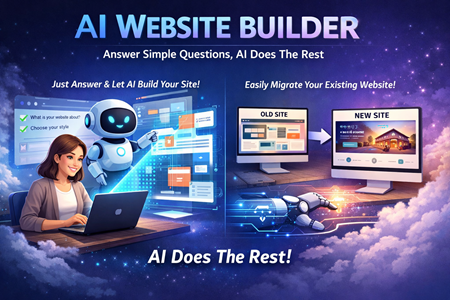
AI makes website creation a breeze!